Unknown's avatar

Posts by rbrooke

Occupation: Founder of Day1 Consulting Location: Huntingdon, England Interests Reading Classical Music Wine Favorite Movies Shrek Toy Story A Canterbury Tale Casino Royale Lord of the Rings – Fellowship of the Ring Favorite Music – currently.... Mozart Piano Concerto no. 25 K503 in C Major Richard Strauss – Four Last Songs Elgar Symphony No 2 in E Flat Major Favorite Books – currently.... All the Patrick O'Brian Aubrey&Maturin novels The Erast Fandorin novels by Boris Akunin The Mathew Shardlake novels by C.J. Sansom Foucaults Pendulum by Umberto Eco (the antidote to the daVinci code crap) The Name of the Rose by Umberto Eco Anything by John Buchan

Geo-Mapping – An example

Well Christmas is over for another year, time to look forward to 2015.

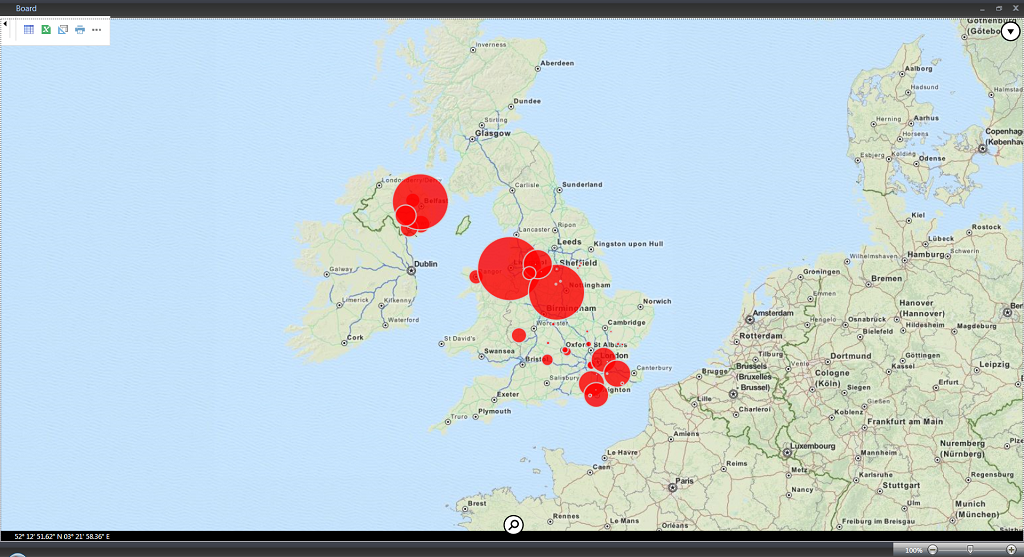
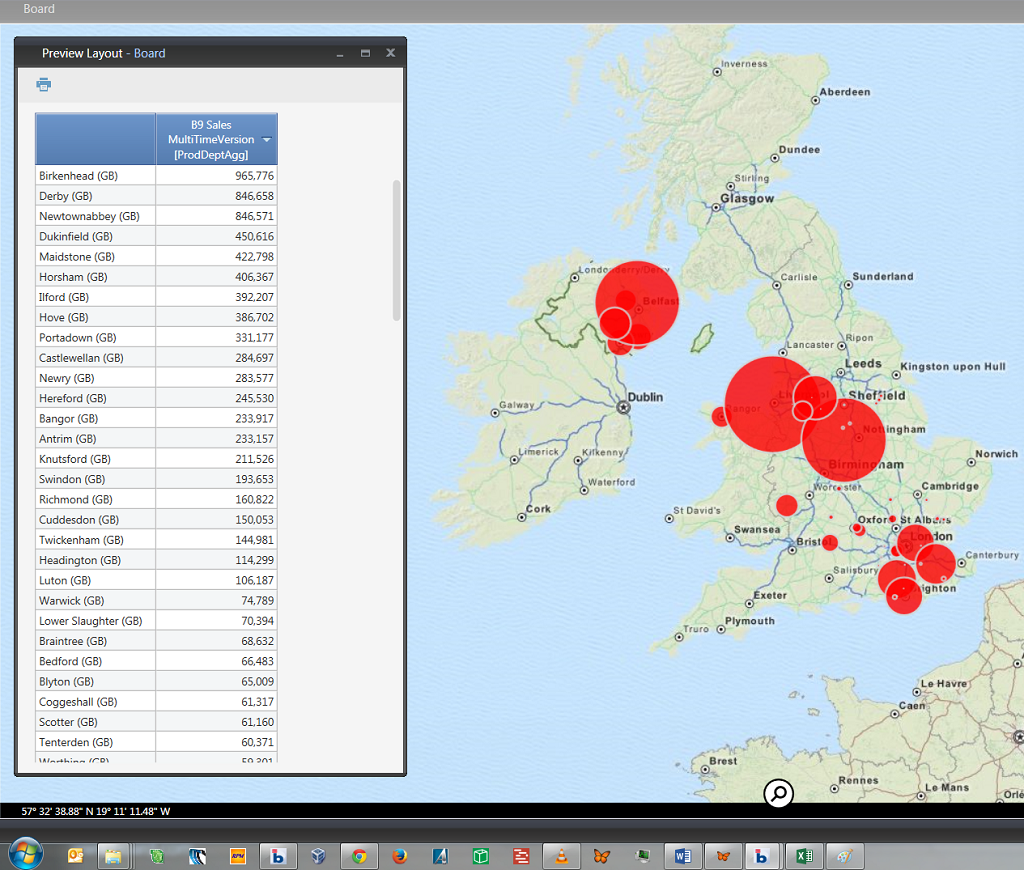
In the quiet period between Christmas and New Year I have been playing about with the BOARD 9 Geo-mapping object as promised in the previous post.

I have created a video tutorial showing how you can create a simple map in a few minutes.

Hope you enjoy.

Update to BOARD 9 YCV Assessment

Further to yesterdays post, I performed some additional optimisation to the database used to test the effectiveness of the improvements to YCV calculations. This has demonstrated that you should attempt to optimise existing cube structures as much as possible before trying Single-Time version cubes.  The performance of Single-Time version cubes is influenced by optimisations far more than Multi-Time version cubes, and the gap between them is considerably narrower than it is if no other optimisations have been made.

So my conclusion is slightly modified. Make sure that you have exhausted all possible optimisations before applying a Single-Time version approach to a cube. Otherwise you may get misleading results.

Attached is a modified version of the original paper reflecting the changed results and comparing the results before and after applying other optimisations.

Board 9 YCV Tests Revised

Board 9 – Fixed YCV, an assessment

This post is very short. Being a techie at heart, one of the new features that caught my eye in BOARD 9 was the fixing of the long standing issue around the calculation of YCV values.

I have completed a thorough assessment to determine how effective this has been. The full paper is attached below. In short, it works correctly but performance needs to be checked on a case by case basis.

Enjoy.

Board 9 YCV Tests

Board 9 Released

For those who don’t yet know BOARD 9 was released yesterday (10th December) and is available from the BOARD support website. http://support.board.com/index.php?/News/NewsItem/View/41/board-90-now-released

So what is new? Lots; lots that we’ve been waiting for and some things that were not expected. Here is the list and my initial thoughts:

  • Predictive Analytics (the B.E.A.M. Engine):
    • Predictive Analytics – Interesting for those requiring advanced forecasting functionality. Limited interest overall I suspect
    • Data Clustering – Uses data mining algorithm to identify clusters in data based on specified criteria. Limited interest overall I suspect
    • Analytics Function – Layout functions for time series analysis, basic statistical analysis and value based analytic functions. Some of these look to be useful, others less so.
  • Nexel – Formula Editor: a dataview overlay that allows complex ‘spreadsheet like’ calculations to be made on the underlying data. Looks like this could have a lot of potential. The document of available functions runs to 503 pages, pretty comprehensive. The downside I can see is that it will make the already difficult job of documenting the calculations being made in a database and capsule, virtually impossible.
  • Layout enhancements:
    • Data entry on a block with ‘Detail By’ !!! At last 🙂
    • Enhancement to the @Selection function, should make it easier to customise report headings etc..
    • Dataview search – wasn’t expecting this one, but could be useful, searches a dataview for specified text and filters the rows accordingly. E.g. searching for ‘Revenue’ could be used to quickly reduce a list of accounts down to the ‘Revenue’ accounts.
    • YCV on aggregate time entities where cube is dimensioned by a more detailed time entity now works without the need to create cube versions for the aggregate time entities. e.g. Sales data by Day – a dataview can be created showing YCV by month without the need to create a versions by month. I’ll believe this when I see it – at least performance wise.
  • Log enhancements – meh
  • Charts – the biggie – at last a new charting engine. Existing charts are still supported, but all new charts will be created using the new engine.
    • New chart types – Radar & Waterfall (yay!!).
    • Great hover over features, e.g. click on a legend value and the related chart elements are highlighted.
    • The pop-out menu includes a ‘quick dataview’ that shows the graph data in tablular format.
    • Loads more – this is going to take some getting used to…..
  • Maps – another biggie – the following map types: (OK, only one of them is really a map in the conventional sense)
    • Geo map. All you need to place data in it’s geographical context is 2 cubes, latitude and longitude. The documentation points you to some websites that can generate a csv file of this information from an input list of location names. So it should be reasonably straightforward to retrofit to existing data.
    • Heat map – exactly what it says it is.
    • Tree map – nice implementation of tree maps that supports nested maps just by using additional row entities. Alert colour coding also makes this neat.
  • Timebar – OK – doesn’t float my boat particularly. Can create a ‘sparkline’ time selector based on a cube. Over the top of this lies a ‘rubberband’ that you can move around and/or stretch to encompass different periods or more periods. The selection is then propagated to the rest of the screen.
  • Additional label and button properties – Some curious stuff in here. Perhaps most interesting is the ability to use an algorithm to generate a dynamic action, e.g. go to different screens based on a cell value. Another interesting possibility is the URL action that can now be assigned, this can be used to open a document, go to a website, open a new email. Could be interesting.
  • Cluster Architecture – Interesting but of limited use for the majority of clients.
  • Mobile – Dataentry, ability to run procedures and report sharing are all valuable new features. The wait for Android continues (HTML5 presumably).
  • New container – ‘Transition’. Allows ‘Powerpoint’ like transitions between container ‘pages’. Nice but not essential.
  • Not documented, I have heard that BOARD now takes into account the existing sparse combinations in the definition of a cube when calculating whether a dataview can be displayed. In earlier versions BOARD would complain that there were too many combinations to display based on the number of logical values that there could be, ignoring the fact that sparsity often means that physically only a fraction of them actually exist. Hopefully this is true, and hopefully it also applies to ‘Extract Layout’ procedure actions which often suffer from the same problem. I will definitely be testing for this…..

So that’s the list as published. I have started investigating these and will report more in the coming days. Keep coming back!